
YouTube Morphe
YouTube Morphe is developed to cater for all RVX users. It is maintained by inotia00 and his team.
Share this app
What is YouTube Morphe?
YouTube Morphe is a new YouTube mod that allows users to watch ad-free videos. It has all the RVX features and more to be added in future. It was initially developed by Inotia00, the only developer of RVX. Now, he is focusing on the Morphe project.
Morphe Project consists of developers who were once a part of the Official ReVanced Project; they were left due to some compatibility issues with the founding developers. So, Inotia00 gathered all of them and started a new Morphe Project to provide an awesome YouTube experience.
App Details
| Name | YouTube Morphe |
| Developer | inotia00 |
| Version | 21.03.34 |
| Size | 170 MB |
| Package name | app.morphe.android.youtube |
Features
We have mentioned highlights here; please visit the patches page to read more about the features.
SponsorBlock
SponsorBlock is an open-source project which allows users to skip the unwanted parts of the video. It includes creator promotions, reminders and even unrelated parts of the video.
Updates
The patch updates are super fast because the dev team fixes bugs within a week. Also, you will find the beta releases to patch.
Customisations
It has a lot of customisations, but the honourable mentions are that you can change App Icon, App Name, Start page, Header Logo, and Layout Factor.
Alternate thumbnails
This option allows you to preview the actual video footage, which means you will see a screenshot of the video. So, there is no creator uploaded thumbnail for authenticity based on DeArrow.
Default Video Settings
Set the video quality of your choice. You can set the quality for the Mobile Network and WiFi. And even Morphe YouTube remembers when you change the quality.
Force Original Audio
This option is in “Video settings”; it basically forces the audio to the original. These days, YouTube forces users to listen to the dubbing audio based on the region they are in. However, you can get away with that.
Seekbar
More precisely, you can find the frame of the video. Change the colour of the seekbar as you wish instead of Red.
Shorts Player Customisations
Morphe YouTube provide a lot of customisations to the shorts player. Here, you can hide all the elements like Likes, Dislikes, Comments, Share, Subscribe and others.
Custom Themes
Themes are the unique point to migrate from ReVanced to Morphe. Enable themes from the patch settings.
Swipe Controls
Use your fingers to increase or decrease brightness and volume. Also, control playback speed.
Show Dislikes Count
YouTube Morphe uses the Return YouTube Dislike Project to show the dislike count. It helps you to decide whether to watch a video or not.
How to Install YouTube Morphe APK on Android?
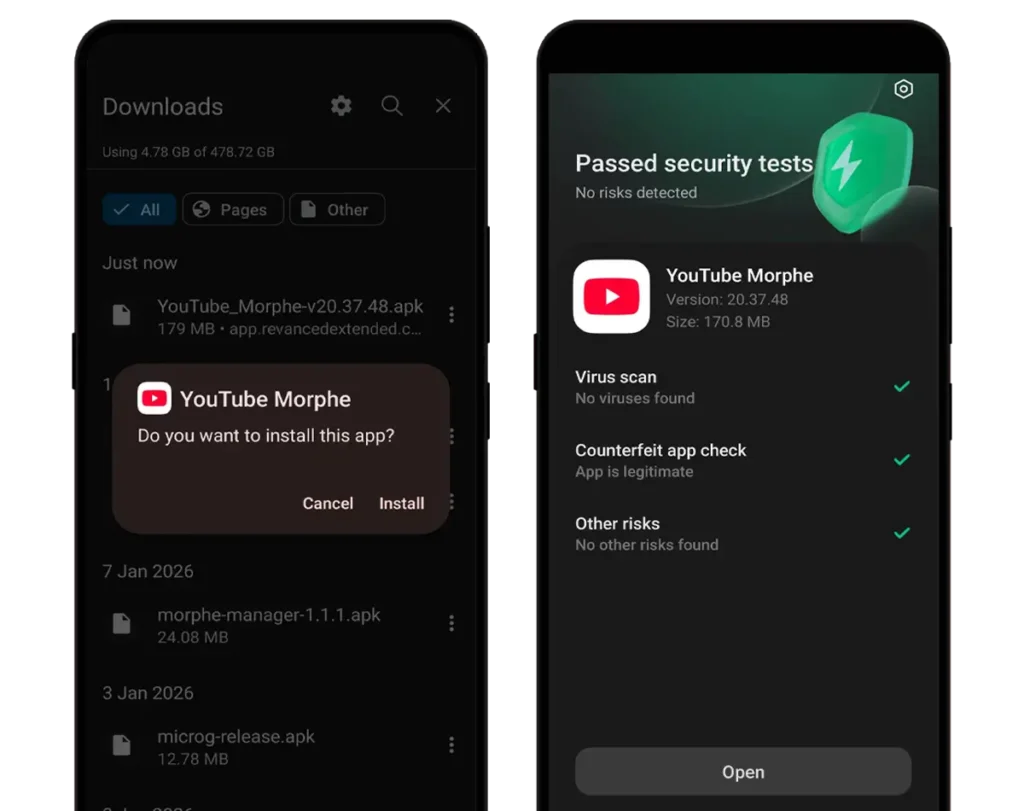
Step 1. Download the YouTube Morphe APK file and MicroG/GMSCore APK file.
Step 2. Now, install MicroG/GMSCore APK by allowing the “Install unknown apps” option.

Step 3. Open the MicroG/GMSCore app and then add your Google Account.
Step 4. Go to the Self-Check option in MicroG/GMSCore and then enable all the options under the “permissions granted” section. (If crashes)
Step 5. Install the YouTube Morphe APK on your Android device.
Step 6. Open the app and enjoy the content.
Note: Install the original YouTube App from the Playstore if YT Morphe crashes